AI integration · Pottsville, PA
You have been hearing about AI. Now it's time to put it to use.
Connects to the software and tools you already use and does any manual task done on a computer, fully autonomously.
- Industry Insights
- Social Media Management
- Data Entry
- Customer Support
- Client and Lead Acquisition
- Keeping you up to date
- Connected to the tools you already use
- Installed, not handed off
Trusted by


The 3 types of AI integration
-
01
AI automations
One task, done on its own. Something you do by hand today happens by itself from now on. When one thing happens in your software, the next thing gets done, every time, without you. The simplest place to start.
-
02
AI agents
Your own employee that lives inside your systems. One role, done end to end. It reads what comes in, decides what to do, and does it: emails, scheduling, data entry, support, KPIs.
-
03
Multi-agent systems
A whole team. Several AI agents, each with its own job, handing work to each other the way coworkers do. Together they run a part of your business on their own and send you the report. An agent is one employee. This is an entire department.
Automations
One task, done on its own.
An automation is one job you do by hand on a computer, done for you without you touching it. It implements into the software you already use and runs every time, on its own.
Real example. A quote goes out of your CRM. If nobody answers in two days, a follow-up email is generated and sent for you. When they book, it's on your calendar and you get a text with who, what they wanted, and when. You never opened the CRM.
Follow-ups, invoices, data entry between systems, notifications, reminders. Any manual task done on a computer. If it's something you repeat, it can be an automation.
Explained. An automation is a trigger. Think of it like this: if X happens, Y happens. If a lead replies to my cold email, this email gets sent to the lead. If a job closes, the invoice goes out. You set the if once, and the then runs every time. It is a task.
AI agents
Agentic employee.
An AI agent is a whole role, done on its own. It reads what comes in, decides what to do, and does it, inside any CRM or software you're currently using. Think of it as an employee for any role done on a computer.
Real example. Your pricing. Supplier costs change every week. The agent reads each new price list, checks every item against the margin you set, and updates the prices in your POS so nothing sells below where it should. Anything unusual, it brings to you with a one-line note. One role, the pricing manager, done every day while you run the store.
Pricing, ordering, scheduling, data entry, customer support, social media. Any role done at a computer, it can do right now. Fully autonomously.
Explained. An agent is a decider. Think of it like this: an automation follows one rule, an agent reads what's in front of it and picks what to do. A new price list comes in. Did a cost go up, stay the same, or look wrong? It works that out and handles each one. You explain the job once, the way you would to a new hire, and it does the job from then on. Think of it as an employee that works around the clock.
Multi-agent systems
A whole team, working as one.
A multi-agent system is several AI agents, each with a role, working together and handing work to each other. The same way a team does, except it runs on its own, inside the software you already use, and reports to you.
Real example. Your marketing. One agent watches your industry and finds what is trending. One researches the topic and writes the script. One makes the video or the image. One posts it to your accounts at the right time. One answers the comments and messages that come back, in your words. They hand each piece to the next one, all week, on their own. Monday morning you get one message: what went out and what worked.
It can essentially replace any role being done on a computer, across the whole operation, fully autonomously. If you can explain how your business runs, Freeborn Digital can build it.
Explained. A multi-agent system is an entire department. Think of it like this: one agent is one employee, a multi-agent system is the whole department working together. Each agent has its own job, and they hand work to each other the way coworkers do. One finds the work, one does it, one checks it, one tells you about it Monday. You get the report.
Your dashboard
See everything your AI is doing.
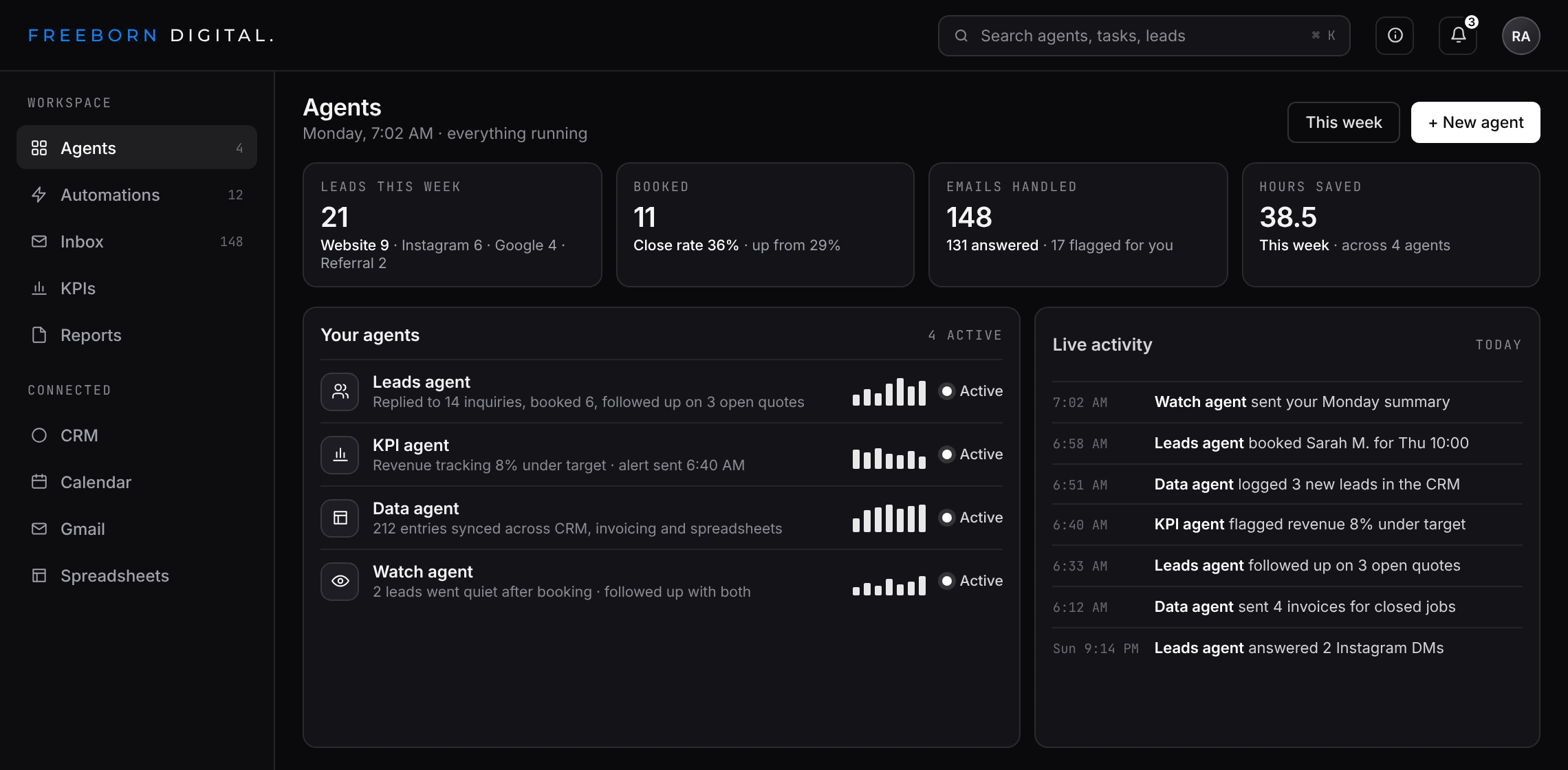
Optional: If you choose to, you get a visual dashboard that shows what your automations are doing. Every email sent, every lead followed up, every KPI tracked, every task done, in one place, as it happens.
Built by Freeborn Digital alongside the automation, so you can see what your agents are doing, all in one place, as it happens.
Start a project
Tell Freeborn Digital what slows you down. You'll see what to build first.
You do not need a specification. A few lines about your business and the work that eats your week is enough to start.
- Compatible with all systems and software, in any industry
- Your software and your data stay yours
- Installed inside the tools you already use
Prefer call? 570-617-7655
Prefer text? 570-617-7655
Prefer email? riley@freeborndigital.com
Received
Freeborn Digital reads it and replies by email.
Common questions
Questions about AI integration
What is AI integration?
AI put into the software you already use, doing the manual work done on a computer: emails, data entry, scheduling, support, KPIs. It comes in three sizes. An automation does one task, an agent does one role, a multi-agent system runs a department.
What is the difference between an automation, an AI agent, and a multi-agent system?
An automation is one task: if this happens, that happens. An agent is one role: it reads what comes in, decides what to do, and does it. A multi-agent system is several agents handing work to each other, an entire department.
Does it work with the software I already use?
Yes. It implements into whatever you run now: your CRM, POS, inbox, calendar, spreadsheets, invoicing, booking. Your team keeps working where they work today, and the AI works inside the same tools.
What tasks can it do?
Anything a role does at a computer. Generating and sending emails, customer support, data entry across systems, scheduling, tracking and updating KPIs, pricing, ordering, social media, lead follow-up, reporting. If you can explain how it is done, it can be built.
Does it act on its own, or do I approve things?
Both, by your choice. You set which actions run on their own and which wait for someone on your team, like payments or emails to clients. Every action is logged with who or what did it and when.
How do I see what it is doing?
A dashboard, if you want one, shows every agent, every task and every result in one place as it happens. You also get a report: Monday morning, one message on where the business stands.
Who owns the system and my data?
You do. The code, the data and the accounts are yours, hosted on your own cloud or servers or by Freeborn Digital, your choice. Your data stays in your system and is used for nothing else.
What happens after I start a project?
Freeborn Digital reads it and replies by email to set a call. On the call you walk through how the business runs and what eats the week, and the first build is mapped. Then it is built, installed into your software, and kept running.
Start with AI Integration, Custom Software, or Custom Websites.